Saturday, 29 August 2015

SIMPLE CALCULATOR PROGRAM IN YACC

LEX PROGRAM


%{
  #include <stdio.h>
#include "y.tab.h"
int c;
extern int yylval;
%}
%%
" "       ;
[a-z]     {
            c = yytext[0];
            yylval = c - 'a';
            return(LETTER);
          }
[0-9]     {
            c = yytext[0];
            yylval = c - '0';
            return(DIGIT);
          }
[^a-z0-9\b]    {
                 c = yytext[0];
                 return(c);
               }


YACC PROGRAM


%{
#include <stdio.h>

int regs[26];
int base;

%}

%start list

%token DIGIT LETTER

%left '|'
%left '&'
%left '+' '-'
%left '*' '/' '%'
%left UMINUS  /*supplies precedence for unary minus */

%%                   /* beginning of rules section */

list:                       /*empty */
         |
        list stat '\n'
         |
        list error '\n'
         {
           yyerrok;
         }
         ;

stat:    expr
         {
           printf("%d\n",$1);
         }
         |
         LETTER '=' expr
         {
           regs[$1] = $3;
         }

         ;

expr:    '(' expr ')'
         {
           $$ = $2;
         }
         |
         expr '*' expr
         {
           $$ = $1 * $3;
         }
         |
         expr '/' expr
         {
           $$ = $1 / $3;
         }
         |
         expr '%' expr
         {
           $$ = $1 % $3;
         }
         |
         expr '+' expr
         {
           $$ = $1 + $3;
         }
          |

         expr '-' expr
         {
           $$ = $1 - $3;
         }
         |
         expr '&' expr
         {
           $$ = $1 & $3;
         }
         |
         expr '|' expr
         {
           $$ = $1 | $3;
         }
         |

        '-' expr %prec UMINUS
         {
           $$ = -$2;
         }
         |
         LETTER
         {
           $$ = regs[$1];
         }

         |
         number
         ;

number:  DIGIT
         {
           $$ = $1;
           base = ($1==0) ? 8 : 10;
         }       |
         number DIGIT
         {
           $$ = base * $1 + $2;
         }
         ;

%%
main()
{
 return(yyparse());
}

yyerror(s)
char *s;
{
  fprintf(stderr, "%s\n",s);
}

yywrap()
{
  return(1);
}


HOW TO COMPILE & EXECUTE CALCULATOR PROGRAM IN YACC

SAVE THE PROGRAM
LEX PROGRAM:  nameofprogram.l
YACC PROGRAM: nameofprogram.y

DO THE FOLLOWING,

lex nameofprogram.l
yacc nameofprogram.y
cc lex.yy.c y.tab.c
./a.out

Enter the Expression
12+12
24

Thank you.

Saturday, 22 February 2014

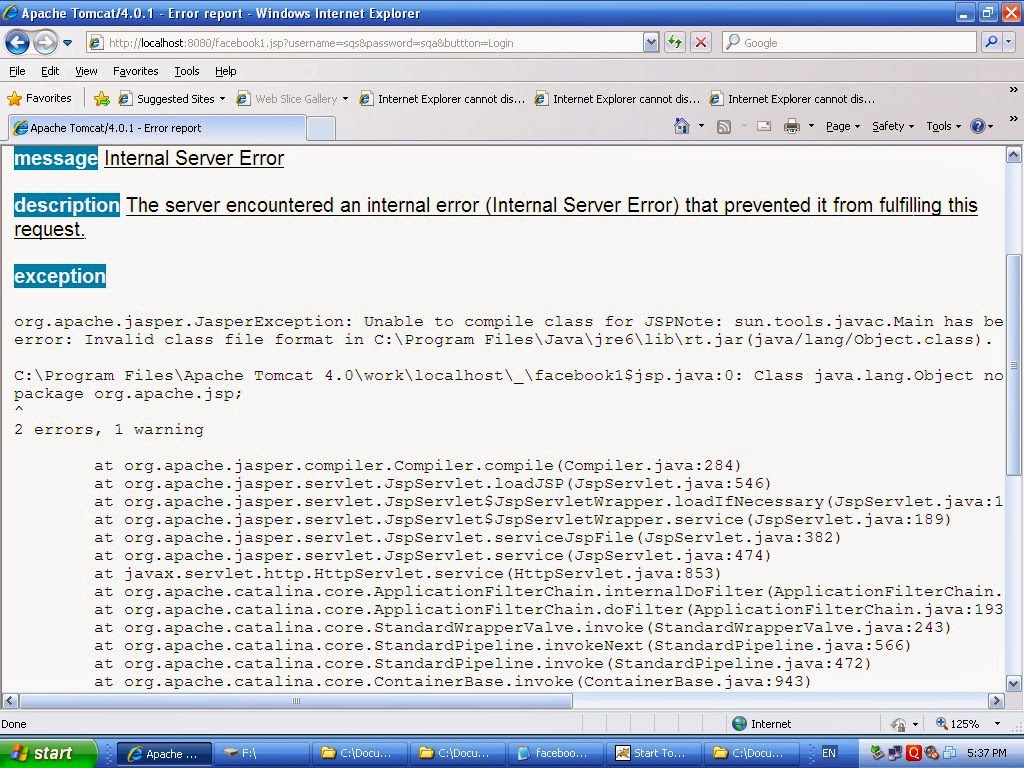
Internal Server Error


Internal server Error


The server encountered an internal error (Internal Server Error) that prevented 

it from fulfilling this request.


Problem Description:

Invalid class file format.

Such error occurred when executing servlet program.

Solution :

Check whether you are installed java on your machine.

If it is installed then please check jre file of java is corrupted or no.

Such problem only occur when Jre on your machine was corrupted.

Just uninstall java and install fresh copy of Java.

Again execute your program and see output will appear.

Thank you.
 

Friday, 10 January 2014

HOW TO COMPILE AND RUN SERVLET PROGRAM


    1)      SAVE SERVLET PROGRAM IN BELOW DIRECTORY OF YOUR MACHINE
C:\Program Files\Apache Tomcat 4.0\webapps\examples\WEB-INF\classes
    
    2)      SET ENVIRONMENT VARIABLE

JUST GO TO MY COMPUTER
RIGHT CLICK ON IT .
GO TO PROPERTIES

        3)      GO TO ADVANCED TAB
CLICK ON ENVIRONMENT VARIABLE TAB


         4)      SET THE FOLLOWING PATH

i)        CLASSPATH
                  Variable name: CLASSPATH
                  Variable value: C:\Program Files\Apache Tomcat 4.0\common\lib\servlet.jar; C:\Program Files\Java\jdk1.5.0_06;

                   PATH ABRIVIATION
                   CLASSPATH
                   Path up to Apache tomcat\common\lib\servlet.jar file,then semicolon followed by jdk directory.

ii)      PATH
                  Variable name: PATH
                  Variable value: C:\Program Files\Java\jdk1.5.0_06\bin;

                  PATH ABRIVIATION
                   PATH
                    Path up to jdk\bin directory .

       5)      AFTER THAT COPY servlet.jar FILE FROM

          C:\Program Files\Apache Tomcat 4.0\common\lib
          AND PASTE IN FOLLOWING DIRECTORY
          C:\Program Files\Java\jre1.5.0_06\lib\ext
          OPEN COMMAND PROMPT & COMPILE SOURCE PROGRAM


          6)      Start tomcat server,

          7)      Go to Internet Explorer, Type following URL

         http://localhost:8080/examples/servlet/Nameof yourServlet


          8)      Thank you

Hello World Program of Servlet

What is Servlet?                                                                                                     
Java Servlet is programs that run on a Web or Application server and act as a middle layer between a requests coming from a Web browser or other HTTP client and databases or applications on the HTTP server.

Types of Servlet

Generic Servlet

The Generic Servlet is an abstract class that is extended by HttpServlet to provide HTTP protocol-specific methods.
The Generic Servlet does not include protocol-specific methods for handling request parameters, cookies, sessions and setting response headers.
Generic Servlet is not specific to any protocol.

       HTTP Servlet

An abstract class that simplifies writing HTTP servlet. It extends the GenericServlet base class and provides an framework for handling the HTTP protocol.
The HttpServlet subclass passes generic service method requests to the relevant doGet () or doPost () method.
HttpServlet only supports HTTP and HTTPS protocol.


HelloWorld Program

import java.io.*;
import java.text.*;
import java.util.*;
import javax.servlet.*;
import javax.servlet.http.*;

public class HelloWorldExample extends HttpServlet {
 public void doGet(HttpServletRequest request,HttpServletResponse response) throws IOException, ServletException
    {
        response.setContentType("text/html");
        PrintWriter out = response.getWriter();
        out.println("<html>");
        out.println("<head>");
        out.println("</head>");
        out.println("<body>");
        out.println("<h1>HelloWorld</h1>");
        out.println("</body>");
        out.println("</html>");
    }
}

Servlet Packages

            Servlet can be created using the  javax.servlet  and  javax.servlet.http  packages, which are a standard part of the Java's enterprise edition, an expanded version of the Java class library that supports large-scale development projects.

HelloWorld Program of Servlet

1. import package
import java.io.*;
This package is for input /output operation.

import javax.servlet.*;
import javax.servlet.http.*;


This two package mainly responsible for Servlets implementation.     

Servlet life cycle            
                                                                                    
                    A servlet life cycle can be defined as the entire process from its creation till the destruction. The following are the paths followed by a servlet.              
The servlet is initialized by calling the init () method.                                                         
The servlet calls service() method to process a client's request.                                     The servlet is terminated by calling the destroy() method.                                           Finally, servlet is garbage collected by the garbage collector of the JVM.                                                                                                                                                                                                                                                                                                                                                            
What is the difference between difference between doGet() and doPost()?    
                                                                                                                                                                   
          doGet () and doPost() are HTTP requests handled by servlet classes.                 
                             In doGet (), the parameters are appended to the URL and sent along with header information. This does not happen in case of doPost(). In doPost(), the parameters are sent separately.                                                                                                                                                                                                                                                                             Since most of the web servers support only a limited amount of information to be attached to the headers, the size of this header should not exceed 1024 bytes. doPost() does not have this constraint.                                                                                                                                                                                                                                                Usually programmers find it difficult to choose between doGet() and doPost().                                                                                                                                                                       doGet() shall be used when small amount of data and insensitive data like a query has to be sent as a request.                                                                                                                                                                                                                                                                         doPost() shall be used when comparatively large amount of sensitive data has to be sent. Examples are sending data after filling up a form or sending login id and password.                                                                                                                      

Friday, 6 December 2013

XML DATABASE


What is an XML Database?

An eXtensible Markup Language (XML) database is a software system that permits data storage in XML format. XML is a meta-markup language used to manage data which employs user customizable tags to organize information. The flexibility of the language, which allows the creation of custom data structures and organizational systems, has led to its widespread use to exchange data in multiple forms. XML databases are often used in applications such as informational portals, document exchanges, and product catalogs.
             It is generally considered more efficient in terms of data conversion costs to use an XML database due to the widespread use of this language in data transportation. There are two major categories of these databases: XML-enabled databases and Native XML databases (NXD). Each type of XML database is used to store different types of data.

An XML-enabled database directs data into a traditional relational database in an XML format. The data is translated for storage, and returned to its initial format upon output. This type of database is used to store data-centric documents which include highly structured information, such as patient records, and only use XML for data transfer.

Native XML databases store XML documents as a whole, instead of separating out the data within them, and are designed to store semi-structured information, such as marketing brochures or health data. XML documents that contain semi-structured data are referred to as document-centric. A native XML database does not conform to a certain physical storage model, being able to use relational, hierarchical, or object-oriented structures as well as custom storage formats. It manages documents by grouping them into logical collections, and can set up and manage multiple collections simultaneously. This type of database permits the user to store any type of XML document, regardless of structure, within the same collection. Queries can be constructed across the whole collection, generally making data organization and manipulation more flexible.

An XML database uses a special programming language designed specifically to extract and manipulate XML documents, known as XQuery. The purpose of XQuery is to allow the construction of flexible queries that can extract and manipulate information from XML documents, as well as other sources that can be translated into XML. Some applications in which XQuery can be used include searching text documents on the Web for relevant data and compiling the results, extracting data from databases to be used in application integration, and generating reports on the data contained in an XML database.

XML and Databases

In the document-centric model of XML where XML is typically used as a means to creating semi-structured documents with irregular content that are meant for human consumption. An example of document-centric usage of XML is XHTML which is the XML based successor to HTML.


Sample XHTML document 


<html xmlns ="http://www.w3.org/1999/xhtml">

<head>                                                                 

<title>Sample Web Page</title>                       

</head>                                                               

<body>                                                                 

<h1>My Sample Web Page</h1>                    

<p> All XHTML documents must be well-formed and valid. </p>

<img src="http://www.example.com/sample.jpg" height ="50" width = "25"/>

</body>                                                               

</html>                                                                


The other primary usage of XML is in a data-centric model. In a data-centric model, XML is used as storage or interchange format for data that is structured, appears in a regular order and is most likely to be machine processed instead of read by a human. In a data-centric model, the fact that the data is stored or transferred as XML is typically incidental since it could be stored or transferred in a number of other formats which may or may not be better suited for the task depending on the data and how it is used. An example of a data-centric usage of XML is SOAP. SOAP is an XML based protocol used for exchanging information in a decentralized, distributed environment. A SOAP message consists of three parts: an envelope that defines a framework for describing what is in a message and how to process it, a set of encoding rules for expressing instances of application-defined data types, and a convention for representing remote procedure calls and responses.


Sample SOAP message taken from w3c soap recommendation


<SOAP-ENV:Envelope xmlns:SOAP-ENV=http://schemas.xmlsoap.org/soap/envelope/      

SOAP-ENV:encodingStyle="http://schemas.xmlsoap.org/soap/encoding/">                            

<SOAP-ENV:Body>                                                                                                                               

<m:GetLastTradePrice xmlns:m="Some-URI">                                                                             

<symbol>DIS</symbol>                                                                                                                      

</m:GetLastTradePrice>                                                                                                                     

</SOAP-ENV:Body>                                                                                                                             

</SOAP-ENV:Envelope>                                                                                                                      


In both models where XML is used, it is sometimes necessary to store the XML in some sort of repository or database that allows for more sophisticated storage and retrieval of the data especially if the XML is to be accessed by multiple users. Below is a description of storage options based on what model of XML usage is required.


Data-centric model:

In a data-centric model where data is stored in a relational database or similar repository; one may want to extract data from a database as XML, store XML into a database or both. For situations where one only needs to extract XML from the database one may use a middleware application or component that retrieves data from the database and returns it as XML. Middleware components that transform relational data to XML and back vary widely in the functionality they provide and how they provide it. For instance, Microsoft's ADO.NET provides XML integration to such a degree that results from queries on XML documents or SQL databases can be accessed identically via the same API.

The alternative to using middleware components to retrieve or store XML in a database is to use an XML-enabled database that understands how to convert relational data to XML and back. Currently, the Big 3 relational database products all support retrieving and storing XML in one form or another. IBM's DB2 uses the DB2 XML Extender. The DB2 extender gives one the option to store an entire XML document and its DTD as a user-defined column or to slice the document into multiple tables and columns. XML documents can then be queried with syntax that is compliant with W3C XPath recommendation. Updating of XML data is also possible using stored procedures.


Document-centric model


                   Content management systems are typically the tool of choice when considering storing, updating and retrieving various XML documents in a shared repository. A content management system typically consists of a repository that stores a variety of XML documents, an editor and an engine that provides one or more of the following features:

o version, revision and access control

o ability to reuse documents in different formats

o collaboration

o web publishing facilities

o support for a variety of text editors (e.g. Microsoft Word, Adobe Framemaker, etc)

o indexing and search capabilities


Content management systems have been primarily of benefit for workflow management in corporate environments where information sharing is vital and as a way to manage the creation of web content in a modular fashion allowing web developers and content creators to perform their tasks with less interdependence than exists in a traditional web authoring environment.


Hybrid model


                In situations where both document-centric and data-centric models of XML usage will occur, the best data storage choice is usually a native XML database. The most coherent definition so far is one that was reached by consensus amongst members of the XML: DB mailing list which defines a native XML database as a database that has an XML document as its fundamental unit of (logical) storage and defines a (logical) model for an XML document, as opposed to the data in that document, and stores and retrieves documents according to that model. At a minimum, the model must include elements, attributes, PCDATA, and document order. Tamino is a native XML database management system developed by Software AG. Tamino is a relatively mature application, currently at version 2.3.1, that provides the means to store & retrieve XML documents, store & retrieve relational data, as well as interface with external applications and data sources. Schemas in Tamino are DTD-based and are used primarily as a way to describe how the XML data should be indexed. When storing XML documents in Tamino; one can specify a pre-existing DTD which is then converted to a Tamino schema, store a well-formed XML document without a schema which means that default indexing ensues or a schema can be created from scratch for the XML document being stored. A secondary usage of schemas is for specifying the data types in XML documents.

ShareThis

Related Posts Plugin for WordPress, Blogger...